

jvnb.over-blog.com/
20 Février 2021

Here is how to crack a ZIP password with John the Ripper on Windows: First you generate the hash with zip2john: Then you run john: In this example, I use a specific pot file (the cracked password list). Select options inside the Finder view, and enter the encryption password you wish to use for your compressed file. Click 'OK' and close out of the Finder view, then click 'Save as' in the Action panel to select a location on your computer for your zipped file. Large Zip Password Recovery. This software gives you well easy tool to recover zip file password by using brute force attack, mask attack, dictionary attack. This software carefully crack zip file password protection and allows to open zip file password it recover large zip password (A-B-C,x-y-z,#.^%$) and allows to re-access zip file password. Sets Os X Password Policies. GitHub Gist: instantly share code, notes, and snippets. Sets Os X Password Policies Raw. This page will help you to retrieve/extract the hash associated to an OSX account. We tried to enumerate all the OS X flavors available, but this article is still 'in beta' depending on the new OS X versions. Once the hash is extracted, you can send it here and we will try to recover it.
Are you worried about your files being accessed without your permission? Sometimes, our confidential data might be stolen due to the files not being protected. If you have some private data, files, pictures, videos and you do not want anyone to see them or access them you can password protect Zip file Mac OS X. If you don't know how to do this, this article will explain you in simple steps.
Cup pong practice. Once you have password protected your zip files on Mac. You must know how to open it when you need to or otherwise the data will be locked forever. This section explains how to unzip password protected zip file mac. Follow the simple steps below to open your zipped files and access them on Max OS X.
Read more:Zip File That Turns Into a CPGZ on MAC OS X. How to Open it
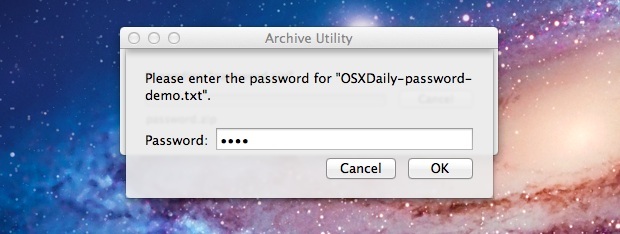
To open an encrypted file, simply double click on it. A pop up will appear on the screen asking you to enter your password, once you enter the password, the zip file will decompress and it will open. You can now access the folder.
So these were the steps how you can password protect your files from being accessed by the attackers and keep them safe at all files. Also, you can decompress them whenever you want to and open these files by just entering your password in a matter of seconds. From now onwards, never worry about your data being leaked out. Stay safe at all times, under all conditions.
Open Password Protected Zip Files on mac: Compressed files is no big deal, Everyone does it and it is needed too if you want to transfer a large file. .ZIP is an archive file format that supports lossless data compression. A .ZIP file may contain one or more files or directories that may have been compressed. Now usually all the Compressed file open on mac the usual way by archive utility which is present as default Unzip functionality in mac, All new Macs running Apple's OS X operating system come with that utility.
When you download a zipped file which may have a password on a Mac, it automatically unzips as you enter the password in the protected Zip Files. But what if you forgot the password or lost it or there is no other way to recover it ? Or be it whatever reason. So I am going to guide you on How to Open Password Protected Zip Files on mac.
There are 2 methods which I will guide you by: Method 1 being using the Mac Terminal which is an application and it lives in the Utilities folder in Applications. You launch it like any other and when you do, you'll see Apple's implementation of a Unix command-line environment, known as a shell. The second Method is by a software for unzipping password protector Using Wine which is a compatibility layer capable of running Windows applications on several POSIX-compliant operating systems, such as Linux, Mac OSX, & BSD. Instead of simulating internal Windows logic like a virtual machine or emulator, Wine translates Windows API calls into POSIX calls on-the-fly, eliminating the performance and memory penalties of other methods and allowing you to cleanly integrate Windows applications into your desktop. on Mac.
Step 1: Open Terminal Utility App on your Mac
Step 2: After Terminal Opened up , Type in : 'unzip -P password (Drag zip file) -d (Drag your destination folder)
Step 3: Hit Enter to the command and let it do the magic.
Skyrim storage size. Step 4: The command result will show the password existing in the password protected zip file.
Step 5: Now Open your Zip file and enter the password and there you go ! Bingo!
Step 1: Download Wine/Wine Bottler on your mac
Step 2: Download a Zip password cracker or a brute force software like
Step 3: Good Zip Password cracker's are available for WIN. SO after downloading the software, which will be in .exe which mac can't run
Step 4: Use the Software, (Eg: AAPR)
Step 5: The complex the password, the more time it will take to track it. Let the software work and you will find the password.
Goodluck and Hope you did it with ease.
So here it is! the perfect two solutions on How to Open Password Protected Zip Files on mac. Usually the one with dmg files zipped or some packaged content then the second is one better. For locked and protected files the terminal method provides a simple solution. Hope this helps you and let us know in the comments, what you think about this.
Terminal doesn't work. It says 'caution: not extracting; -d ignored'


/image%2F6318759%2F20210327%2Fob_bf9f12_pitcher-vst-crack.jpeg)
/image%2F6318759%2F20210221%2Fob_4724eb_just-unzip-it.jpeg)
/image%2F6318759%2F20210221%2Fob_1d0d56_pressit-cd-labelling-kit.jpeg)
/image%2F6318759%2F20210221%2Fob_e27fb6_nintendo-switch-undertale.jpeg)